By Nero Niche · Published · Content updated . Built Sendlore after losing track of 400+ saved links.
An AI bookmark manager is a tool that saves what you find online – links, videos, social posts, screenshots – and can summarize and tag content when processing succeeds, making saved information easier to search in plain English, instead of just storing a title and a URL in a folder. It sits between two older categories, bookmark managers and read-it-later apps, built around the part both struggle with: finding what you saved again.
Key takeaways
- The main benefit is retrieval: Find saved material by the ideas and details you remember, not only by a title, folder, or manually assigned tag.
- Search is limited by what was captured: Restricted posts, unavailable transcripts, and metadata-only saves may offer less searchable information than a fully processed article.
- Choose according to your workflow: Read-it-later apps focus on reading, traditional bookmark managers on organizing links, and AI bookmark managers on finding and reusing saved information.
What is an AI bookmark manager, exactly
An AI bookmark manager does three distinct jobs, and understanding them separately is the fastest way to actually understand the category – not as one blurry "AI-powered" feature, but as three specific things happening at three different moments.
Capture is how something gets in: pasting a URL, using a browser extension, forwarding an email, or sharing directly from a phone. This part isn't that different from a traditional bookmark manager – you're still telling the tool "save this."
Understanding is what happens when the tool can access and process the source: it extracts available content and may generate a summary and tags without manual filing. Some sources are partially processed or remain metadata-only, so the available search evidence can vary from one save to the next.
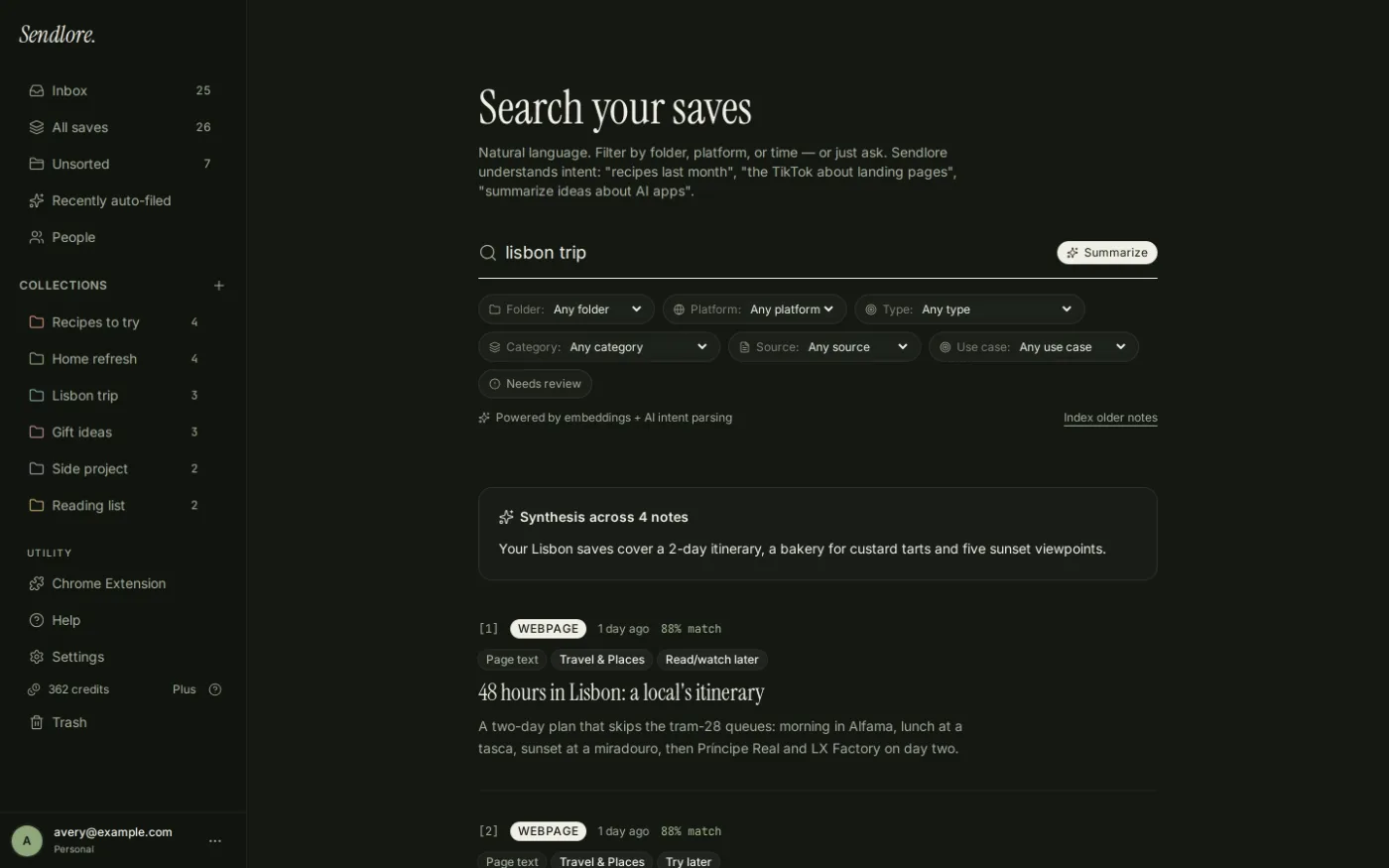
Retrieval is how you get it back later – and this is where the category earns its name. Instead of browsing folders or remembering an exact title, you describe roughly what you're looking for in plain English, and the tool matches against the summary, tags, and content itself, not just the URL you happened to save it under.
Three jobs, one tool. A traditional bookmark manager mostly does the first job and leaves the rest to you. A read-it-later app adds a fourth job – reading – that most AI bookmark managers don't prioritize. The rest of this piece walks through exactly where those lines sit.
How it's different from a traditional bookmark manager
Traditional bookmark managers emphasize saving, organizing, and browsing links. AI bookmark managers emphasize searching and reusing the information captured from those links, often with semantic retrieval or generated context. These categories now overlap: some established bookmark managers offer AI-assisted organization, full-text search, and conversational retrieval.
For example, Raindrop.io Pro now offers full-text search, AI Suggestions for collections and tags, and Stella, an AI assistant for asking questions about saved material. Its core product still emphasizes bookmark organization, but it is inaccurate to describe Raindrop.io as a manual-only tool with no content understanding or AI capabilities.
The practical question is how reliably each tool can retrieve a source when you cannot remember its title or where you filed it. Compare the types of content each tool actually captures, whether its search uses full text or meaning, and how it handles incomplete or restricted sources rather than relying on the category label alone.
An AI bookmark manager removes that dependency. When content can be processed, an AI bookmark manager can create summaries and tags without manual filing. Metadata-only or incomplete captures may offer less searchable detail, depending on what the tool was able to retrieve. It's the same underlying job, a reference library rather than a reading queue, just with a meaningfully different amount of manual upkeep required to keep it useful.
How it's different from a read-it-later app
A read-it-later app is built around the reading experience – clean formatting, a queue, sometimes offline access and highlighting – for content you intend to read start to finish, almost always articles. An AI bookmark manager is built around capture and retrieval across more content types than articles, and generally isn't built as a dedicated distraction-free reading surface.
Instapaper and Matter are the clearest examples of the read-it-later model: strip the ads and clutter from a page, format it for calm reading, let you read offline, and in some cases let you highlight passages as you go. That's a genuinely different job than an AI bookmark manager does, not a lesser version of it – reading well and finding things again are separate problems, and these tools are optimized for the first one specifically.
Most AI bookmark managers, by contrast, don't have a reading mode at all, or treat it as secondary. What they're built for instead is handling the content types a reading-focused tool typically can't: a TikTok, a YouTube video, an Instagram post, a Reddit thread – content that isn't "an article to read start to finish" in the first place, and that a read-it-later app would store as little more than a title and a link.
For the fuller side-by-side – including which named tools fall into each category and a decision table – see the difference between read-it-later apps and bookmark managers rather than repeating that breakdown here.
What actually makes it "AI" – six capabilities to know
Six specific, nameable things separate an AI bookmark manager from a bookmark manager that just added a chatbot. Naming them individually matters more than the blanket claim – "AI-powered" could mean any one of these, or none of them.
Summaries and tags for processed saves
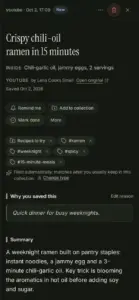
When the tool can process a source, it can generate a short summary and topic tags without manual filing. This matters because it means the content itself becomes searchable later, not just whatever title you happened to save it under. A lot of what you'd actually search for months later ("the one about retention, not the growth one") lives in a summary, not in link text, which is exactly the gap this capability closes.
Semantic and exact duplicate detection
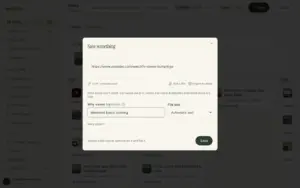
Duplicate detection can distinguish exact URL matches from potentially similar sources, but the available actions depend on the tool and capture method. In Sendlore's manual web-app Save dialog, a pre-save match may offer Merge, Replace source, Add as related, or Keep both. Merge attaches the incoming URL as an alternate source and appends any new why-saved text to an existing note; it does not combine note bodies, summaries, or media. After saving, Sendlore can flag suspected near-duplicates for review, but it does not automatically merge existing notes.
Natural-language search
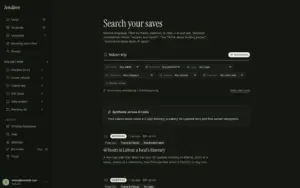
Instead of remembering a folder, tag, or exact title, you ask a plain-English question – "that thing about pricing strategy from last month" – and the tool matches against everything it knows about what you saved: the summary, the tags, the content, sometimes a transcript. This is the capability that most directly answers the actual complaint that sends people looking for one of these tools in the first place: not "I never saved it," but "I saved it and now I can't find it."
Related-notes surfacing
When you open something you saved, other saves on the same topic surface alongside it automatically, without you searching for them. That means you rediscover things you'd forgotten you saved, not just find what you remembered to look for – which matters because a meaningful share of what's genuinely lost in a saved-links pile isn't lost because it's unsearchable, it's lost because you'd never think to search for it at all.
A why-I-saved-this note
An optional note, captured at save time, where you write down your own reason for saving something. This is often what you'll actually remember later – "that made me rethink the onboarding flow" is a far stronger memory hook than whatever the article was titled – and it becomes a high-weight search signal rather than a comment nobody reads again. It's a small feature that directly targets the recall-vs-recognition gap that makes saved links hard to find in the first place.
Video and social transcript capture
For saved videos and social posts, the tool can pull a transcript or caption text, so search covers what was actually said, not just a title and thumbnail. Reliability varies by source – strong for YouTube, best-effort for platforms like TikTok, Instagram, and X, with an honest metadata-only fallback rather than fabricated content when a real transcript isn't available. This capability is what actually makes multi-format capture useful rather than decorative – auto-detecting a TikTok link is meaningless for search if nothing about its content is ever indexed.
A few honest caveats, since accuracy matters more than a clean feature list: there's no confirmed voice-note capture in this category as implemented by Sendlore specifically, so treat any "save a voice memo" claim skeptically until you've verified it against the actual product rather than a marketing page. Auto-detected platforms, for Sendlore specifically, are TikTok, YouTube, Instagram, Twitter/X, and Reddit; Substack and other newsletter links typically save fine but as a generic article, not under a distinctly labeled platform name – a small but real distinction if you're evaluating tools on platform breadth specifically.
What problem this actually solves
Saving something takes about two seconds. Going back to find it takes a lot more than that – and that gap is the actual problem every category discussed on this page exists to solve, in different ways.
A plain bookmark manager and even a read-it-later queue both rely on you remembering something specific about a thing you saved – a folder, a title, a tag – specifically so you could stop having to remember it in the first place. That's a strange bargain: you saved something so your memory wouldn't have to carry it, but finding it again still depends on your memory carrying at least a fragment of it.
AI bookmark managers exist because that retrieval gap, not the saving part, is where things actually go wrong. Saving was never the hard part – plenty of tools handle that fine. What breaks is the moment weeks or months later when you know you saved something and can't get back to it, and a bare link with no summary, no note, and no memorable title gives you nothing to search by.
For the deeper dive into exactly why that gap opens up – the specific mechanics of why saved links pile up unread – that's covered in full elsewhere on this blog; this page's job is the category, not the full diagnosis.
Who actually needs one
Not everyone needs an AI bookmark manager specifically – it's worth being honest about who each category actually fits, rather than assuming the newest one is the right one for everybody.
- Mostly save plain articles and want to read them cleanly later? A read-it-later app fits better – you don't need automatic tagging or semantic search if reading, not finding, is the actual habit.
- Want a simple reference library and don't mind tagging things by hand? A traditional bookmark manager is enough. If you're already disciplined about filing things as you save them, you may not need automation you'll rarely notice.
- Save a mix of articles, videos, and social posts, and want retrieval handled automatically instead of relying on your own filing system? That's the specific fit for an AI bookmark manager – the category exists for people whose saved pile doesn't fit neatly into "articles to read" or "links to file," and who don't want to do the organizing themselves.
AI bookmark managers after Pocket's shutdown
Pocket's shutdown is worth mentioning here briefly, not as a full recap – that's covered in depth elsewhere on this blog – but because it's the moment a large number of people were forced to actually think about which category they needed, often for the first time.
Mozilla shut down Pocket's saving feature on July 8, 2025, and closed data export for good on November 12, 2025, per Mozilla's own support page. Millions of displaced users went looking for a replacement, and most landed on either a traditional read-it-later app or a newer AI-powered tool without necessarily realizing those are two different categories solving two different problems – they just wanted "the new Pocket," and Pocket itself had blurred the line by doing a bit of both, adequately, for a decade.
That migration moment is a large part of why this three-way distinction matters now in a way it didn't a few years ago: the category boundaries used to be mostly academic, and now a lot of people are actually choosing between them for the first time, often without knowing that's the choice they're making. For the fuller comparison of what replaced Pocket specifically, see best Pocket alternatives.
What to look for when choosing one
A comprehensive category page should leave you able to actually evaluate a specific tool, not just understand the category in the abstract. Here's the checklist worth running through before picking one:
- What content types does it actually capture? Articles only, or video and social posts too – and if it claims the latter, does it do anything with that content (transcript, summary) or just store a title and a thumbnail?
- How does search actually work? Keyword-only, semantic/natural-language, or a conversational chat interface – these feel similar in a feature list and are genuinely different in practice.
- Does it auto-summarize and auto-tag, or leave organization to you? This is the line between "AI bookmark manager" and "bookmark manager with an AI label on it."
- Does it have a reading mode, offline access, or highlighting, if those matter to you? Most AI bookmark managers don't prioritize these – if a clean reading experience is what you actually want, that's a real gap to check for, not assume away.
- How does it handle duplicates? A library that quietly fills with near-identical saves gets harder to search over time, regardless of how good the search itself is.
- What happens to your saved source if the original page goes offline? Some tools keep a cached copy or full transcript; others just keep a now-dead link.
If you want to see how specific tools stack up against this checklist, best AI bookmark managers and best read-it-later apps for 2026 cover the two categories most people are actually choosing between at this point.
Where Sendlore fits
Sendlore is an AI-powered swipe file for saved links, videos, and posts – built around capture-anything (paste a URL, use the Chrome extension, forward an email, save a screenshot) with capabilities including summaries and tags when processing succeeds, exact and semantic duplicate checks, natural-language search, related-notes surfacing, why-saved-this notes, and transcript capture when the source permits.
Say the tradeoff plainly: there's no offline reading yet (in progress), no highlighting or annotation, and no dedicated distraction-free reading mode – so if a clean, offline reading experience is the main thing you want, a read-it-later app is a better fit for that specific need, and pretending otherwise wouldn't serve you.
Sendlore's actual fit is the person whose saved pile is a mix of articles, videos, and social posts, and whose real problem is finding things again – not reading them in a polished queue. If that's not your situation, one of the other categories on this page probably fits better, and that's a genuinely fine outcome; not every tool needs to be for everyone.
If finding what you saved, specifically, is the actual complaint that brought you to this page, a Pocket alternative built around finding links again covers that angle in more depth than this category overview can.
FAQ
Is an AI bookmark manager the same as a read-it-later app?
No. A read-it-later app is built around reading – clean formatting, offline access, sometimes highlighting – almost always for articles. An AI bookmark manager is built around capture and retrieval across more content types, and usually doesn't have a dedicated reading mode. They solve different problems and can overlap, but they're not interchangeable terms.
Is an AI bookmark manager the same as a regular bookmark manager?
They share the same underlying job – a reference library, not a reading queue – but a traditional bookmark manager relies on folders and tags you apply by hand, while an AI bookmark manager auto-summarizes, auto-tags, and lets you search by meaning instead of remembering exactly how you filed something.
Can an AI bookmark manager save videos and social media posts, not just articles?
Yes, in the tools built for it specifically – this is one of the category's defining traits, not a nice-to-have. Look for auto-detection of specific platforms (TikTok, YouTube, Instagram, and similar) and transcript or caption capture, since a tool that just stores a title and thumbnail for a video isn't really solving this problem.
Do I have to organize my saves into folders for an AI bookmark manager to work?
No – that's the specific point of the category. Auto-generated summaries and tags mean your saves are searchable whether or not you file anything by hand, and natural-language search works across everything you've saved regardless of folder structure. Some tools still auto-suggest folders for browsing, but they're optional, not required for search to work.
Is Sendlore an AI bookmark manager?
Yes – Sendlore can summarize and tag processed saves, check for exact and similar sources, flag suspected near-duplicates for review, and support natural-language search across saved material. It does not automatically merge existing notes. It doesn't have a dedicated reading mode or offline access yet, so it fits findability needs specifically, rather than replacing a read-it-later app.
If your saved pile is more than plain articles – a mix of videos, threads, and things you'll want to find again rather than read start to finish – that's the specific gap Sendlore is built for. See how it handles your own saves before deciding.