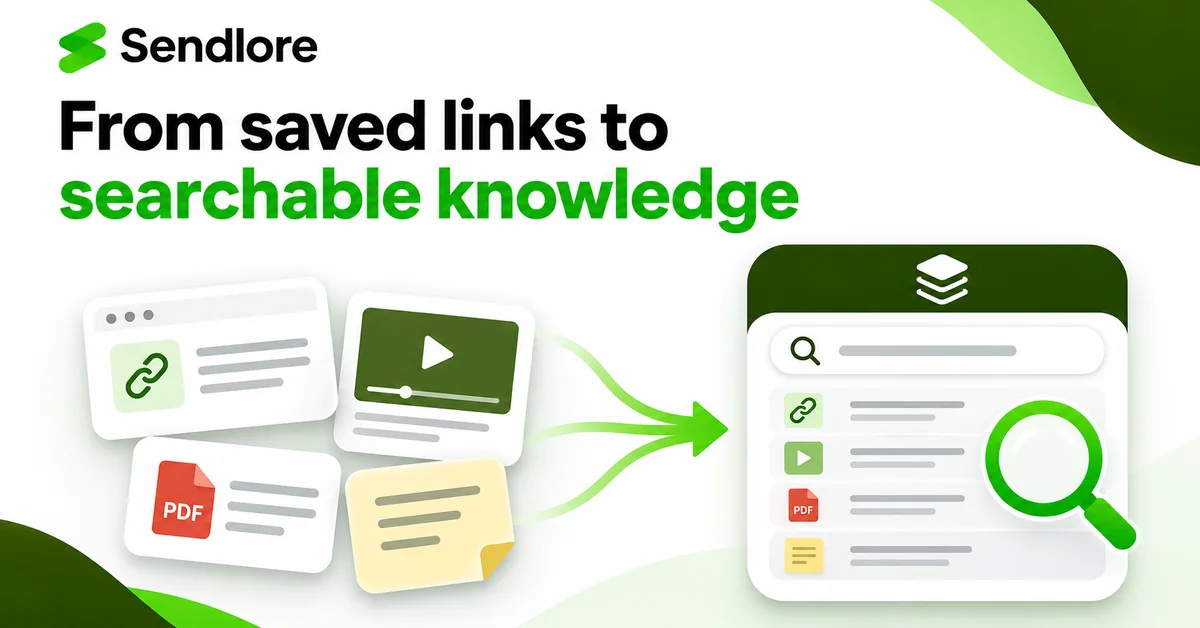
A searchable knowledge base is a collection of information you can search by what it means, not only by the exact title or word you remember. For a researcher, student or professional, the practical version is a personal library where every saved link, video, note and file keeps the reason you saved it. You can then search that library in your own words and ask questions it answers from your own sources. Nero Niche makes Sendlore, an AI bookmark manager built for exactly this job, and this guide explains the idea first so you can judge any tool, ours included, against it.
TL;DR
- A knowledge base stores explanations and context for people to read. A database stores records for software to process.
- Search by meaning matches your wording to the content’s meaning, so you can find a page without recalling its title or exact phrase.
- A bookmark folder holds addresses. A knowledge base holds addresses plus your note on why each one matters.
- You can build a personal one in five steps: capture, add context, organize lightly, search, and ask questions of your sources.
- Sendlore’s Free plan costs $0 per month. Paid plans add AI processing credits and features such as library access through AI assistant integrations.
Table of Contents
- What a searchable knowledge base is
- Knowledge base or database: the difference in plain terms
- How search by meaning works
- Why the reason you saved something belongs in the library
- How to build a personal searchable knowledge base
- What “AI knowledge base” means for your own library
- Can ChatGPT serve as a knowledge base?
- Who benefits most
- Privacy and trust in a personal library
- Where Sendlore fits
- FAQ
- Sources
What a searchable knowledge base is
A knowledge base is a central library of information organized so people can find answers on their own. HubSpot’s definition lists typical contents such as how-to guides, FAQs and product documentation. Companies use them for support and internal training.
The word “searchable” is the part that matters most to you. A folder of files is also a collection, but you can only find an item if you remember where you put it or what it was called. A searchable knowledge base is built so that a question like “that article about sleep and memory from last spring” can lead you to the right item.
For an individual, the same idea applies at a smaller scale. Your sources might include:
- articles and papers you plan to cite
- videos and talks you want to revisit
- social posts with a useful argument or data point
- notes to yourself
- supported files such as PDFs
What turns that pile into a knowledge base is not the volume. It is that each item is findable and that you can recover why you kept it.
Knowledge base or database: the difference in plain terms
People often ask whether a knowledge base is just a database. They overlap, but they serve different purposes.
A database holds structured records: orders, customers, inventory, each in fixed fields that software reads and writes. A knowledge base holds explanations, procedures and reasoning that a person reads to understand something. Sanity’s glossary makes the useful point that the line is about intent, not technology. The test is whether the store exists to be transacted against (a database) or consulted for an answer (a knowledge base). Many knowledge bases sit on top of ordinary databases.
Here is how that looks for a student writing a thesis:
| Database | Knowledge base | |
|---|---|---|
| What it holds | Records in fields | Articles, notes, sources, explanations |
| Who reads it | Software | You |
| Typical question | “Show all rows where year = 2024” | “What did that study say about sample size?” |
| What makes it useful | Accuracy of each value | Whether the answer still applies and you know where it came from |
Your saved research belongs in the right-hand column. You do not need to design tables. You need to keep sources and your own understanding of them in one place.
How search by meaning works
Traditional keyword search looks for the words you type. If you remember a page as being about “remote work and focus” but its title says “deep concentration outside the office,” a keyword search can miss it.
Semantic search, or search by meaning, closes that gap. It converts both your query and the stored content into embeddings, which are numeric representations of meaning. Supabase’s documentation on semantic search gives an example: a search for “increase text size on display” can match a page titled “How to adjust font size in settings,” because the meanings are close even though the words differ.
Two practical consequences follow for a personal library:
- You can search the way you think. You rarely remember titles. You remember a gist, a claim, a use you had in mind.
- Your own notes become searchable too. If you wrote “good counterexample for chapter 3” when you saved a link, that phrase is part of what you can search later.
Keyword search still has a role. When you remember an exact name, a quotation or an identifier, matching the literal text is the fastest route. That is why Sendlore offers both keyword and semantic search: use the exact words when you have them, and describe the idea when you do not. You can read more about the feature on our page about AI bookmark search by meaning.
Why the reason you saved something belongs in the library
Most saved links fail for the same reason. The address survives, but the purpose does not. Three months later you see a title and cannot tell whether it supported your argument, contradicted it, or was a tool you meant to try. We have written about this pattern in why saved links become a black hole.
A searchable knowledge base fixes this at the moment of saving. Alongside the source, you write one or two lines of context:
- Why it matters: “Strongest source for the funding claim.”
- What it is for: “Use in the methods section.”
- What to do next: “Compare with the 2023 survey.”
That habit costs ten seconds per item and changes what search returns. Instead of a list of titles, you get items with your reasoning attached. Sendlore is designed around this: it keeps the reason you saved an item alongside its source, so what you retrieve includes both.
How to build a personal searchable knowledge base
You can build one with any disciplined system, but the steps below are the ones that matter. At each step we note what Sendlore does so you can see where the work goes.

1. Capture from wherever you find things
The main failure at this step is friction. If saving takes more than a click or a share, you will skip it for the items that seemed minor but later turn out to matter. Capture also needs to reach beyond the browser, since research arrives through videos, social posts, emails and conversations with assistants.
Sendlore accepts items through the web app, a Chrome extension, an iPhone Shortcut, email, and AI assistant integrations. It handles links, videos, social posts, notes and supported files, so you do not need a separate place for each type. The Sendlore Chrome extension is the quickest path while you browse.
2. Bring in what you have already saved
Most people start with a backlog: browser bookmarks, saved posts, a long list of tabs. Moving it in once means you search one library rather than five. Sendlore supports imports, including a step-by-step route for importing Chrome bookmarks and one for X bookmarks.
The imported backlog will lack your context, since you did not write any at the time. Do not try to annotate it all. Add a note when you next touch an item, and let search by meaning cover the rest.
3. Add the reason, in your own words
This is the step that makes the library a knowledge base rather than a pile. Write what the item is for, using the words you would use to look for it. A note like “evidence that spaced practice beats cramming, for the study-skills essay” will surface from many different later searches.
Sendlore also provides summaries and transcripts where available, so a long video does not require you to take notes from scratch. Your own note still carries the one thing a summary cannot: why you cared.
4. Organize lightly
Folders and tags help, but over-organizing is where many systems stall. A workable rule is to use a handful of folders for projects (a thesis, a client, a course) and a few tags for recurring themes. Let search handle everything else. Sendlore includes folders and tags, so you can keep that structure as thin or as detailed as your work needs.
5. Search, then ask
Start with search to find the item. Then, when you want an answer rather than a source, ask a question across your library. In Sendlore, answers are source-linked, so each one points back to the captured content it came from and you can check the original. That matters for research and coursework, where you need to cite the source rather than repeat a summary. Our page on asking your saved research with AI describes how this works.
What “AI knowledge base” means for your own library
An AI knowledge base is a set of your own material that an AI tool can draw on to answer questions in plain language. The important part is the word “your.” The answer is built from the sources you stored, not from general knowledge alone.
That design has two benefits for researchers and students:
- Answers can be grounded. When each answer links to the saved source, you can verify the claim before you rely on it.
- Context travels with it. Because the reason you saved something is stored with the item, the answer can reflect your purpose, not just the page’s content.
A good habit is to treat an AI answer as a pointer to your sources. Open the linked item, confirm the passage, then cite the original.
Can ChatGPT serve as a knowledge base?
Partly, and for a different job. OpenAI’s help documentation on creating and editing GPTs explains that a custom GPT can use uploaded files as reference material, with up to 20 files per GPT and each file up to 512 MB. That suits a fixed set of documents you want a GPT to consult.
A research library is a different shape. It grows daily, mixes links, videos, posts and notes, and depends on remembering why each item mattered. A tool built for capturing and retrieving that material, with context stored per item, fits that routine more directly. If you also work in an AI assistant, Sendlore’s paid plans include library access through AI assistant integrations, so your saved material can be reached from there.
Who benefits most
- Researchers who need to keep sources with the reasoning behind them and return to them months later.
- Students who gather material across courses and need to retrieve it by topic when an essay or exam arrives.
- Professionals managing digital content, such as writers and product builders, who reuse saved research. We have pages for content writers and founders and builders.
- Anyone who has lost a good link and could not say what it was for.
If you like the idea of one library that links ideas across sources, see our overview of the second brain app for saved research.
Privacy and trust in a personal library
A personal knowledge base often holds unpublished drafts, client research and half-formed ideas, so privacy deserves a look before you commit. Sendlore keeps libraries private by default, and individual notes can be shared when you choose to. It also supports sharing and exports, so your material is not locked in. Details on capture, privacy, export and pricing are in the Sendlore FAQ.
Whatever tool you use, check three things: who can see your items by default, how you can export them, and whether answers cite the sources they use.
Where Sendlore fits

Sendlore is an AI bookmark manager and personal knowledge library. You save links, videos, social posts, notes and supported files with your own context. You can then search by keyword or by meaning, and ask questions answered with links back to your sources. We make it, so weigh this section as the publisher’s view.
The Free plan costs $0 per month. Paid plans add AI processing credits and features such as library access through AI assistant integrations:
| Plan | Monthly | Yearly |
|---|---|---|
| Free | $0 | n/a |
| Plus | $9 | $90 |
| Pro | $19 | $190 |
| Max | $39 | $390 |
If you use more credits than your plan includes, top-ups are available: 250 credits for $5, or 1,000 credits for $15, as one-off purchases. See the Sendlore pricing page for what each plan includes.

To see the approach before changing your habits, start with a small project: one course, one report, one client. Save ten sources with a reason each, then search for them a week later by describing the idea. You can try it on the Sendlore home page.
FAQ
What is the difference between a database and a knowledge base?
A database stores structured records, such as orders or customer details, for software to process. A knowledge base stores explanations and sources for people to read and understand. The practical test is intent: a database is built to be transacted against, a knowledge base to be consulted for an answer.
Is a bookmark manager a knowledge base?
It can be, if it stores more than addresses. A plain list of links is a collection. A bookmark manager that keeps your reason for saving, supports search by meaning and answers questions from your sources works as a personal knowledge base. Sendlore is built to do that.
What is search by meaning, and when should I use it?
Search by meaning, or semantic search, matches the idea behind your query to the idea behind the content, so different wording still finds the right item. Use it when you remember the gist but not the title. Use keyword search when you remember an exact name or phrase.
Does ChatGPT have a knowledge base?
Custom GPTs can use uploaded files as reference material, with up to 20 files per GPT and up to 512 MB each, according to OpenAI’s help documentation. That works well for a fixed document set. For a growing mix of links, videos and notes with context, a dedicated library like Sendlore is designed for the task.
How much does it cost to start?
Sendlore’s Free plan is $0 per month. Plus is $9 per month or $90 per year, Pro is $19 per month or $190 per year, and Max is $39 per month or $390 per year. Credit top-ups are $5 for 250 credits and $15 for 1,000 credits.
Sources
- What is a knowledge base, and why do you need one? (HubSpot)
- What is a knowledge base? Definition and how AI agents use it (Sanity)
- AI semantic search (Supabase docs)
- Creating and editing GPTs (OpenAI Help Center)